
Social Media Manager | GoHighLevel Expert | Lead Generation Specialist
I find the right leads and build systems that follow up automatically
“So no opportunity gets missed. B2B and B2C lead research, GoHighLevel setup, and social media management, done with care and double-checked.”
Jason DaquipilAbout me
I’m a social media manager and lead generation specialist who builds GoHighLevel systems. I research the right prospects, reach out for you, and set up automations that keep following up, so no opportunity gets missed. Accuracy comes first in everything I do. That habit started in data analysis.
Services
What I can do for you
Five services that cover finding leads, reaching them, and keeping your pipeline organized.
Lead generation
Verified B2B and B2C lead lists built with LinkedIn Sales Navigator, Apollo.io, and Clay.
Outreach and appointment setting
Cold outreach through email, LinkedIn, and DMs, with booked calls going straight to your calendar.
GoHighLevel setup
CRM, pipelines, workflows, funnels, landing pages, booking calendars, and email/SMS automation.
Social media and ads
Content, scheduling, and Facebook/Meta Ads managed from one plan.
Data and spreadsheets
Data entry, data cleaning, and tidy spreadsheets and CRM records you can trust.
Projects
Selected work
Hover a project to preview it, click to open it. These show how I build AI agents, research and track leads, run campaigns, plan a full work week, and review websites.
Voice AI agent (Alex)
A GoHighLevel Voice AI agent that calls small business owners for my website business, qualifies them, and books a free 30-minute consultation call straight into my calendar.

PipelinePilot AI
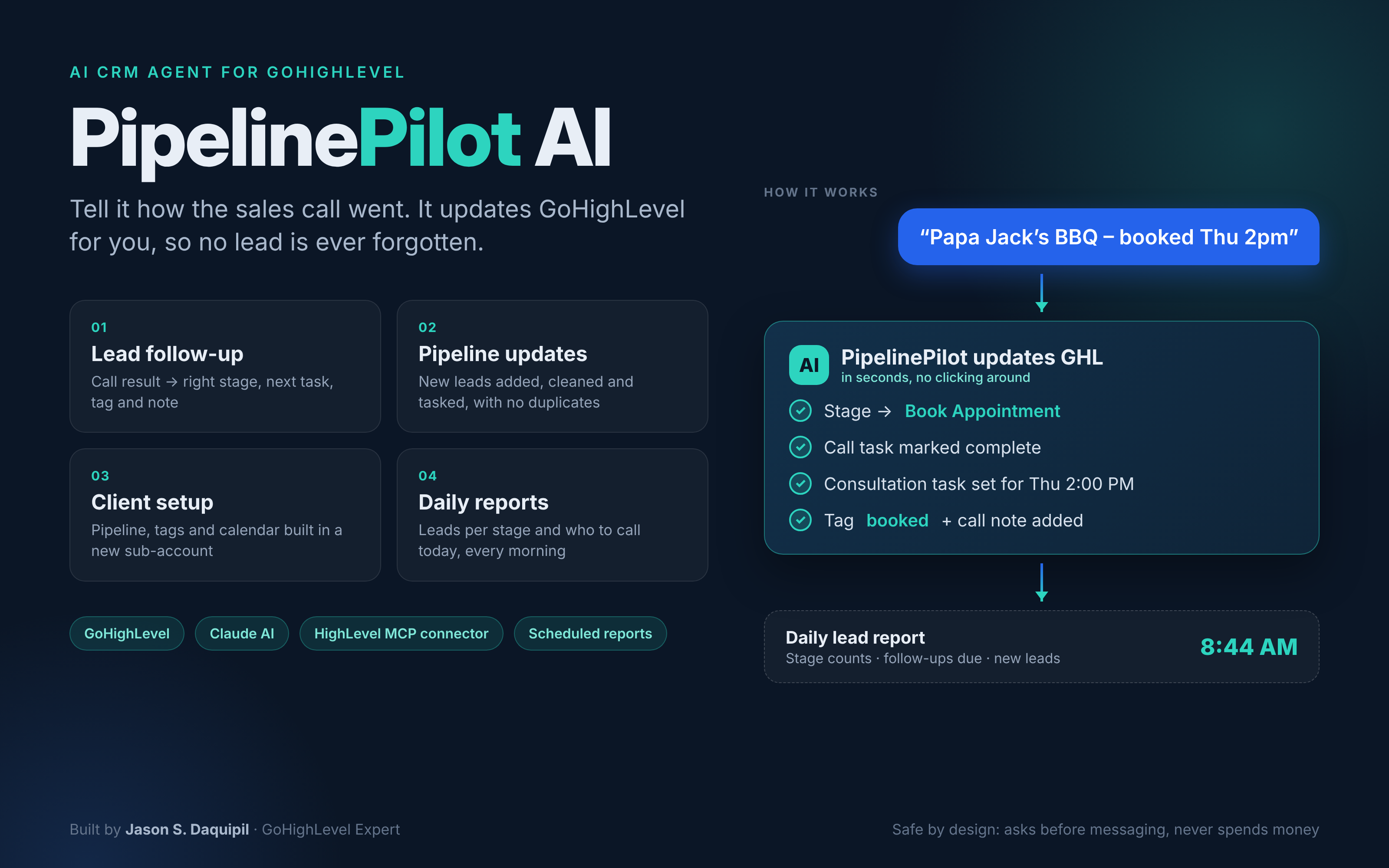
An AI CRM agent I built with Claude and the HighLevel MCP connector. I tell it how a sales call went, and it updates the stage, tasks, tags, and notes in GoHighLevel, then sends a daily lead report every morning.
Prospect Finder Agent and No-Website Lead Research
An AI agent I built in GoHighLevel Agent Studio that finds local businesses without a website, removes the ones already in the CRM, adds the new ones as tagged prospects, and emails a summary.

Lead tracking in Clay
Connected campaign activity to a Clay table through a webhook, with scoring and intent labels for each contact.

Cold email campaign
Ran a two-step email sequence with A/B variants and tracked opens, clicks, and replies for every step.

Calendar management
Planned a full work week (Nov 22–28) for a busy business owner. I took 35 of their 39 tasks off their plate, fit color-coded work blocks around their real calendar, flagged overdue items, and wrote a step-by-step plan for the top priority: fixing the Facebook lead form so leads reach GoHighLevel again.

Website speed audit
Checked page speed and structure with GTmetrix to find what slows a page down.

Portfolio demonstration visuals using sample data.
Voice AI agentAlex: Website Consultation Agent
Purpose
Handles calls for my website business so I don't have to. Alex qualifies small business owners who don't have a website yet (construction companies, hotels, restaurants, real estate agencies, and other local businesses in the USA, Europe, and Australia) and books them straight into a free consultation call, so no interested lead is lost.
How it works
- Greets the callerAlex speaks first, introduces himself as my assistant, and checks that he is speaking with the business owner or decision maker. If not, he asks for the best person and time to reach them, then ends politely.
- Qualifies the leadAlex asks one short question at a time: business name and type, city and country, whether they already have a website, how customers find them today, what they want from a website, and their timeline (next 1–3 months).
- Books the consultationIf the lead is interested, Alex offers a free 30-minute Website Consultation Call, checks my calendar with the booking tool, and confirms their name, email, and the date and time in their own time zone.
- Sets a follow-upIf the lead is interested but busy or unsure, Alex asks for a good time to follow up and confirms their best email or phone number.
- Ends politelyIf the lead is not interested, Alex thanks them and ends the call without pushing. Spam guard and hang-up settings handle robocalls and dead lines.
Built with
Prospect Finder Agent and No-Website Lead Research
Purpose
Keeps my pipeline full of fresh leads without hours of manual research. The agent looks for businesses in my target industries and areas that don't have a website yet, which are the exact clients for my website service, and hands them to me ready for outreach.
How it works
- Runs on a scheduleSet up to run weekly, and it can also be started manually at any time.
- Finds prospectsAsks for the area (any city in the USA, Europe, or Australia) and the business types (construction companies, restaurants, hotels and resorts, real estate agencies, and other local businesses). It finds 10 prospects by default, up to 25, from public listings using web search, or Apify or Apollo when they are connected.
- Preview modeCan run a preview that shows the list first and saves nothing to the CRM, so I can check the leads before anything is added.
- Removes duplicatesChecks the CRM and drops any business that is already a contact, so nobody gets contacted twice.
- Adds them to the CRMSaves each new business as a tagged prospect contact, and as a deal in the pipeline when one is set.
- Scores websitesTargets businesses with no website or a weak one. For prospects that do have a site, it can score the website so weak or outdated sites stand out as leads too.
- Sends a summaryEmails a summary of the new prospects so I can start outreach right away.
Built with
PipelinePilot AI
Purpose
Tell it how the sales call went, and it updates GoHighLevel for you, so no lead is ever forgotten. Instead of clicking through the CRM after every call, one plain sentence is enough to keep the pipeline, tasks, and notes up to date.
How it works
- Tell it how the call wentType one plain sentence, for example: "Papa Jack's BBQ – booked Thu 2pm".
- Lead follow-upPipelinePilot moves the lead to the right stage (here, Book Appointment), marks the call task complete, sets the next task (a consultation on Thu at 2:00 PM), and adds a "booked" tag and a call note, in seconds.
- Pipeline updatesNew leads are added, cleaned up, and given tasks, with no duplicates.
- Client setupBuilds the pipeline, tags, and calendar in a new client sub-account.
- Daily reportsEvery morning it sends a lead report: leads per stage, follow-ups due, new leads, and who to call today.
- Safe by designIt asks before sending any message to a lead and never spends money.
Built with
Website designs
Sample websites
Websites I designed and built in GoHighLevel. Click any design to open the live site.
 Visit website 01BagaRestaurant websiteA dark, warm design for a grill restaurant, with glowing ember effects, the menu, and table reservations.
 Visit website 02TahananReal estate websiteA clean property site where buyers describe the home they want and see matching listings.
 Visit website 03VelaroHotel & resort websiteA full-screen photo hero with an elegant logo and a booking bar for dates and guests.
 Visit website 04Prestige BuildersConstruction company websiteA minimal, premium look for a home builder in Bayugan City, with projects, services, and a quote request.
GHL automations
Automations I built
Real workflows I built in GoHighLevel. Click a workflow to see it up close, with what it does and why.
AI Call: Inbound
Purpose
Makes sure every incoming call answered by the AI voice agent ends with the right next step, so no caller is forgotten and the team always knows what happened.
How it works
- TriggerStarts when an incoming call is completed (call direction is "Incoming").
- AI call classificationThe AI agent reviews the call and labels the outcome.
- Six outcome pathsA condition sends the lead down the matching path: follow up, no answer, not interested, voicemail, requested booking appointment, or none.
- Team is notifiedEvery outcome sends an internal notification so the team sees the result right away.
- Next step for each outcomeFollow up gets a task, not interested updates the opportunity in the pipeline, and a booking request creates a "call back lead" task. The leads are then passed to Conversation AI to continue by text.
- Loop protectionIf a lead's reply doesn't match any condition, they get a "no-condition-looped" tag and one more try. If they were already looped, the workflow stops, so it never repeats endlessly.
- Timeout handlingIf the lead doesn't reply in time, the AI tags are removed, a "no AI conversation reply" tag is added, and the contact is removed from the workflow for manual follow-up.
Built with
AI Call: Outbound
Purpose
Turns every outbound AI call into a clear result and next action, so leads that were called get the right follow-up without anyone sorting calls by hand.
How it works
- TriggerStarts when an outgoing call is completed (call direction is "Outgoing").
- AI call classificationThe AI agent labels how the call went.
- Outcome pathsThe lead is routed to follow up, no answer, not interested, voicemail, requested booking appointment, or none.
- Team is notifiedAn internal notification goes out for every outcome.
- Follow-up actionsTasks are created for follow-ups and call-backs, the opportunity is updated for not interested leads, and leads are handed to Conversation AI to keep the conversation going.
- SafeguardsThe same loop protection and timeout handling as the inbound workflow: one retry when a reply doesn't match, then tags are updated and the contact is removed if there's no reply.
Built with
Lead Status: Pipeline Update
Purpose
Keeps the Lead Pipeline and the automations connected: when a lead moves to a new stage, the matching action starts on its own, so the pipeline always shows the real status of every lead.
How it works
- TriggersStarts when a lead's stage changes in the "Lead Pipeline" to Contacted, Book Appointment, 7 Days Nurturing, Not Interested, or Clients.
- Lead status journeyA condition checks which stage the lead moved to and sends them down that path.
- ContactedThe AI agent calls the lead, then the workflow waits 1 hour and checks if the call connected to the AI call workflow. If it did, the lead is removed from this workflow. If not, it loops back so the AI agent tries again.
- Booked appointmentThe lead is added to the appointment workflow.
- Not interestedA tag is added and the opportunity is updated.
- Nurturing 7 days and ClientsThese stages end here, with no further action in this workflow.
Built with
Process
How I work
A clear four-step process, so you always know what happens next.
Discovery
We discuss your goals, audience, and current setup.
Strategy
You receive a clear plan and timeline.
Build / Create
I build your system, content, and visuals.
Optimize & Support
I refine results and stay available after launch.
Experience
Where I’ve worked
Accuracy comes first in everything I do. It started in data analysis.
Lead Generation Specialist and Social Media Manager
Stay consistent and grow an engaged audience.
- Content strategy
- Content creation & scheduling
- Growth & engagement
- Analytics & reporting
GoHighLevel Expert Portify Creatives
Get a complete system that captures and converts leads on autopilot.
- Account setup & customization
- Funnels, landing pages & websites
- Forms, email & SMS campaigns
- Automation workflows
- CRM & pipeline management
- Calendars & appointments
- Third-party integrations
Data / Statistical Analyst Philippine Statistics Authority
Worked with data where accuracy matters, which shapes how carefully I handle every list and record today.
- Data collection
- Data processing
- Data validation
- Statistical analysis
- Report preparation
- Data interpretation
- Data dissemination
Completed a lead generation training program and was one of only two award recipients out of more than 100 trainees.
Awards & certificates
Recognition and training
Programs I completed and the award I earned. Click any certificate to view it larger.
Tools
Tools I use
I double-check my work and ask questions when something is unclear instead of guessing.
 GoHighLevel
 WordPress
 Canva Pro
 CapCut Pro
 Meta Business Suite
 Slack
 Asana
 LinkedIn Sales Navigator
 Apollo.io
 Clay
 Instantly
 Meta Ads Manager
 Google Analytics
 Google Workspace
Contact
Let’s talk about what you need
Message me and tell me where leads are slipping through. I will point out where to start.
[email protected] Jason Daquipil